Automation of workflows makes your life easier! I have explain the benefit of automation in this blog, please check it out if you are interested! By automating repetitive jobs, we can decrease the time spent on boring work and spend more time on work that requires creativity and focus.

But this is easier said than done. How do we automate? I will introduce the basic idea and explain with an example.
Procedure to automate the workflow
- clarify the current workflow
- evaluate the potential of automation
- look for the tools to automate it
- putting works to automate the process
Clarify the current workflow
First of all, a clear investigation of the current workflow is needed. A suggestion is that we draw the current workflow into a flow chart, which specifies each task and their relation in detail. A good flow chart clears our minds and provides a full picture of the task. You can try this free tool to draw flow chart: draw.io.
Evaluate the potential of automation
After drawing the flow diagram, it is important to evaluate the potential of the workflow automation. More specifically, for each task in the flow diagram, we can classify it into one of two types: it is the task that requires manual interaction, or can be purely done by assigning some rules? For instance, the design of the postcard for the party requires manual work, while the calculation of the monthly salary of each worker can be done by assigning a formula. After the classification of the tasks, we can proceed to the next step to find a suitable tool to automate them.
Look for the tools to automate it
The third step is to survey a suitable tool to perform the automation. Here are some tips, most software will provide certain functions, which called Application Programming Interface (API), allowing users to perform the automation. For instance, Microsoft Excel provides the formulas and functions or uses Visual Basics of Application (VBA) for automation. Other than that, by using some programming language, such as Python, we can have great control of functions, such as manipulating the data, controlling the computer file system like creating or deleting files, or calling some software automatically.
Putting works to automate the process
Congratulations, at this moment, you may already understand the potential of the automation of your workflow, and it’s time to put in the effort to automate it. By using the tools in the third step, you can script them and put them into production. This step may take some time, however, it is a one-time effort and brings great impact to your work. Additionally, the help of some generative AI tools, like ChatGPT will probably help the implementation.
Example
Here let me demonstrate an example, imagine you are a land surveyor, your daily job is to go to the site and use the total station to collect the on-site data, bring it back to the office, and draw it into the site drawing software, finally you need to export the drawing into PDF for submission. Your workflow may be like this.
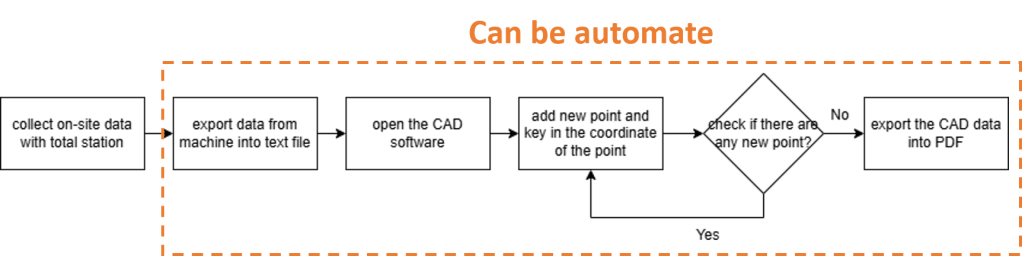
Now let us inspect the workflow, the collection of on-site data needs to be done manually. However, for the rest of the sub-tasks, there are repetitive tasks and can be formulated by a rule:
For each point data collected, draw a point with a coordinate at the surveyed longitude and latitude into the drawing software. After drawing all points, export the drawing into PDF format.
Given this rule, as the drawing software provides the functions (most software will provide), all the tasks can be automated, and save you tons of time for data processing.
Conclusion
In conclusion, these steps are suggested to evaluate the automation potential of your current workflow: draw the workflow diagram in detail, classify the sub-tasks according to the automation potential, look for suitable tools, and finally automate them. This may cost you some time, but I encourage you to invest in it, as it helps to avoid repetitive tasks and decrease boredom in the jobs.
Thanks for reading! Can you analyse your daily tasks? Which of them can be automated? Please like and share your thoughts in the comments!
 Pixel Decoder
Leave a comment